Posts

HowTo: Frostwire install on Ubuntu Linux 16.04. Answered for Carl of SC.

Image
Frostwire Application   "Switch to GNU/Linux and get your freedom on today!" A message I've been working to share for years! A simple way that I do this, is by wearing a shirt that says "Linux" as often as I can.   So I was out on a road trip, proudly wearing my Ubuntu GNU/Linux shirt, and I pulled into a gas station to get a snack. That's when I met Carl.   Carl saw my shirt and complimented Linux. We nearly did a high five right there in the gas station! Then, after a quick exchange of praise for our favorite operating system, and a solid hand shake, Carl asked if I knew how to solve a problem he was having with installing the Frostwire application for Ubuntu 16.04, or even in Pinguy OS .    Frostwire  is a GPL licensed , free and open-source software (FOSS) application for use with bit-torrent(file sharing/distribution), media-download(i.e., from YouTube, archive.org, etc.), and/or media-playback of a myriad of different media content types (i....

(Updated) Chrome Browser Freezing Up Your Linux Box? Try This:

Image
Being an absolutely avid GNU/Linux user, I am always very much enjoying my technological freedom! In fact, switching to GNU/Linux is among the better choices I've ever made, career-wise and from the standpoint of weilding the cutting edge when it comes to Technology! Get Yours! That said, I use two web browsers on my Linux machines: Google's Chrome and Mozilla's Firefox. The thing with using Chrome on GNU/Linux, and it's good and a bad thing - is that the Adobe(tm) Flash plugin is integrated into the Chrome. So until all Flash content gives way to HTML5 content on the web, Chrome gives me the most functionality for the current Internet. Google's Chrome is an awesome an powerful browser that's based on the Open Source Chromium project. This is an awesome project that helps to provide the most access to the web, from all sorts of devices and operating systems - it's cross-platform-compatible. Google Chrome is awesome, but one thing I've noticed...

(updated) How To: Ubuntu 16.04 GNU / Linux - Netgear Wireless AC Adapter AC600 ( AC6100 ) Dual Band

Image
Update - 9/16/2017 SIMPLY DO THIS ONE STEP TO SEE IF IT MAKES YOUR ADAPTER WORK: Try building the driver by running this in the terminal (ctrl+alt+t): sudo apt-get install rtl8812au-dkms It works for me in Ubuntu 17.10 (Artful) If the above doesn't get your wireless working, then start the process from the rest of this blog post by first running: sudo apt-get remove rtl8812au-dkms Continued below... Another GNU/Linux adventure. This time with Ubuntu GNU/Linux 16.04, kernel - uname -r - 4.4.0-12-generic. So I went shopping at my local Walmart (TM), and picked up this Netgear (TM) Wireless AC Adapter AC600 (A6100) Dual Band USB wireless adapter and brought it home to install in my GNU/Linux rig. Plug it in and nothing... No wireless connection detected! Why does this still happen! The year is 2016, why do we still have to manually setup wireless adapters for GNU/Linux? Oh well, good honest CLI training for the users to understand their new system I gu...

How to fix slow video in Supertux 0.3.4 (FOSS game)

Image
Supertux2, is a fantastic free open source ( FOSS / GPL ) 2d side-scroller game, similar to the Super Mario Bros variety. My children have been playing this awesome game for years. This awesome game is available in most GNU/Linux distros via their software package-management systems. It's also available for other OSes. In the case of the Debian-based GNU/Linux, the packages are available for the previous version of Supertux (sudo apt-get install supertux-stable), and Supertux2 (sudo apt-get install supertux). To learn more about Supertux, checkout the project page for Supertux is supertuxproject.org Thanks to all the great efforts from the Supertux team for this awesome game! Supertux2 is the newest of the Supertux games and is fabulous. However, the Supertux2 game appears to have a bug where the "auto" selection of video rendering can result in very slow behavior from the game. You can check the video setting for Supertux2 from the terminal(CTRL+ALT+t) with ...

Hulu.com - No Video Love For Linux Users(even paying ones); Modern Technology Fail!

Image
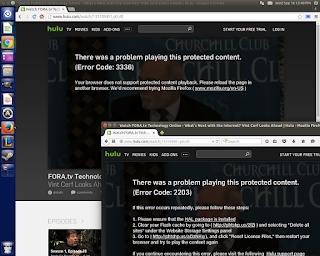
(UPDATE 2-13-2016) - Hulu now working on Google Chrome browser again! Hulu folks - for us Linux users, please test before breaking Hulu on Linux in the future. Thanks for looking out. Self-driving cars, the international space station, major stock markets, bullet trains, top supercomputers, billions of smart phones, animated movies, science, education, entire citties, and even the very Internet that we rely on for information and connectivity everyday. These are just a few of the amazing things that are brought to us thanks to the power of the GNU/Linux operating system!! So why is it that hulu.com wouldn't test to ensure us GNU/Linux desktop users weren't blocked by their latest DRM/video-rendering update? C'mon hulu.com, I'm a paying customer - and hulu.com used to work just fine for me on my Ubuntu GNU/Linux systems. Now when I try to view hulu.com, I'm presented with this problem and can't watch the videos at all: To hulu.com's credit, it...

How To Set Default Grub / kernel / boot option on Ubuntu GNU/Linux 14.04

Image
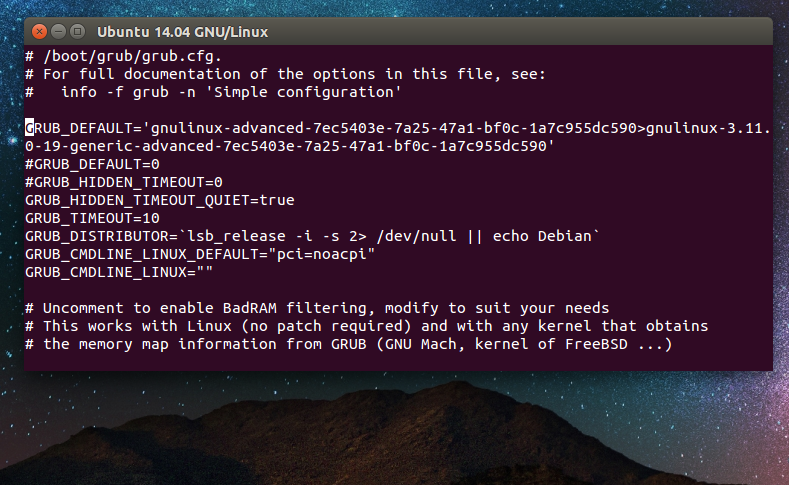
Looking around on Google (or whatever one's favorite search engine); one can usually find everything they need in terms of tips for making GNU/Linux work optimally. But sometimes, you just want to do one specific thing, and although the required documentation is available, it may be questionable because you can't figure out if the fix exactly matches what you need for your system. Finding the fix online, along with too much information about how to implement it, is what happened in recent situation I encountered. A friend brought me his Gateway Laptop. The laptop was failing to boot (kernel panic) after some recent updates that were run. So I referred to my technical library, Google, and although I was able to find an answer, it wasn't immediately clear to how to implement the fix to my friend's specific situation. So for that reason, and for the reason of being able to quickly get of this jam in the future, I decided I would write up the specific steps that hel...

How to Install Virtualbox 4.3 + Resizable Guest Video Resolution on Ubuntu 13.10 GNU/Linux

Image
While I really like the FOSS KVM (Kernel-based Virtual Machine), KVM can be just a bit daunting for the more GUI-oriented types. So, for the newly experienced, I usually recommend they try Oracle's Virtualbox virtual machine software from virtualbox.org. The Ubuntu repositories have Virtualbox available, but it is the older version. This post provides instructions for installing the newer Virtualbox 4.3 in your Ubuntu 13.10 GNU/Linux box. Also, I've outlined the steps needed to install the packages inside the guest Ubuntu 13.10 virtual machine and make the video resolution re-sizable with the window. These steps also enable the Ubuntu guest to have larger screen resolution or even fullscreen resolution. For the purpose of this writeup, I use Ubuntu 13.10 GNU/Linux as both the HOST operating system, and the Virtualbox GUEST operating system. This posting assumes that you know how to install and configure Ubuntu GNU/Linux as the guest OS. These first set of steps are us...